Radish: Daikin HVAC Network Integration
TL;DR: Radish is a project that can snoop on a Daikin communications bus, decode traffic into structured messages, and begin to participate on the network as a compatible node. See the repo and docs for more information or to implement it yourself.
I have a love-hate relationship with my home’s HVAC system. On one hand, it’s new and efficient. On the other, however, some of the control decisions that it makes seem completely inane to me. Therefore, I’ve been on a journey of discovery to see how I might be able to make it better.
Ye Olde System
I used to have a very simple HVAC system: an air handler in the attic, a single-stage A/C unit outside, and a gas-fired boiler with radiators. This was all controlled by a single thermostat in the living room.
If the thermostat called for cooling, it would close two relays: one to turn on the air handler fan and another to start the outdoor unit. The air handler had no brain: the fan was either on or off, and that’s all it did. Likewise, the outdoor unit itself simply used its signal to close a contactor to turn on its own fan and the compressor.
If the thermostat called for heating, it would close a different relay to turn on the boiler. The boiler itself is a bit smarter. Given that “on” signal, it goes through a sequence involving turning on the water circulation pump, the exhaust fan, the gas valve and igniter, etc., always checking things along the way so that neither the house blows up nor we get carbon monoxide poisoning if something is faulty.*
Most thermostats would work with this type of setup, and in my case, I used a Nest. Rather than simply keeping to a setpoint, it learned when to heat and cool based on the weather, the schedule, whether anyone was home, and even demand response signals from the electric company.
Modernity
The old setup was all reasonably good, but the A/C was showing its age, so last fall, before certain tax credits expired, I had it* replaced with a Daikin heat pump. This can provide both cooling and heating, and it’s modulating, so rather than just on/off, it has a whole range of speeds at which it can run, depending on how much cooling or heating the house actually needs. This makes it a lot more efficient. It also has a number of sensors for measuring things like air temperature and actual compressor speed. The air handler is more efficient as well, with a variable speed fan and sensors of its own.
In order to take full advantage of this functionality, I had to switch from my trusty Nest to a proprietary Daikin OneTouch thermostat. This is because, rather than simple on/off signals from the thermostat, each piece of equipment needs to be able to talk to one another. In order for the thermostat to call for 55% cooling or for the heat pump to signal that it’s time to run a defrost cycle, there needs to be a common digital language that everything can speak, and unfortunately, the Nest can’t speak it.
The OneTouch does speak the language, but otherwise, I would consider it a downgrade. For instance:
- When the setpoint changes on schedule, the thermostat freaks out and runs the system at full blast to get to the new temperature as quickly as possible, rather than gently preheating/precooling the house beforehand.
- Rather than making use of the whole dynamic range of 0-100% for things like cooling demand or fan speed, it only ever selects a limited subset of such values, leading to overcooling and cycling, which a modulating system is supposed to be able to avoid doing.
- It seems to measure the wall temperature, rather than the air temperature, resulting in thermal lag and massively overshooting the setpoint when using the radiators (and it doesn’t learn to not do that).
- It doesn’t have any kind of motion/presence detector, so it doesn’t light up when you approach it, nor can it know the home’s occupancy status except through location settings in the app.
- It doesn’t have an “eco” mode for extended time away, like if we’re traveling.
- Because it uses a proprietary language, you’re locked into Daikin’s ecosystem, and the thermostat costs two to three times what I believe it should.
Let’s Go Gardening
These frustrations led me to consider my options. For starters, there’s a Home Assistant integration I’ve installed called Daikin One, which interacts with Daikin’s Skyport API. This allows you to see quite a bit of the data that the system collects, as well as to control its mode and setpoint. Depending on how fancy I want to be with my automations, this can resolve a lot of the thermostat’s issues. However, that’s kind of kludgy, and it relies on continued access through Daikin’s servers, which goes against the Home Assistant ethos of local control.
Upon further investigation, I learned that the Daikin communicating protocol is based on something called ClimateTalk, which was an effort of various manufacturers to create an open standard for communicating HVAC equipment. That alliance eventually dissolved, but some manufacturers continue to use the standard. Armed with the specification documents and some tidbits of knowledge from various forum posts and GitHub repos, I figured that I should be able to implement something that could communicate with this network locally.
First, though, I needed a name. There’s a project called Faikout that allows for local control of certain Daikin mini-split units. It was originally called Faikin until Daikin complained, so I wanted something with an innocent but clever name. There’s a type of radish, daikon, which is common in East Asian cuisine and is also good for improving hard clay soil. So, I figured Daikin versus daikon was a fun connection, but as that’s perhaps a bit too close, I decided to christen this project Radish.
Into the Weeds
At the lowest level, ClimateTalk is based on RS-485.* This uses two wires and differential signalling to send data, even over long distances and through noisy environments. I don’t need all the details, just a device that can convert it into something a microcontroller can understand. So I bought an AtomS3 Lite and Tail485 from M5Stack to use as the project’s brain and converter, respectively. After a few false starts and even a blown fuse*, I got these wired up and flashed with an ESPHome configuration that reads up to 256 bytes at 9600 baud from the bus and pushes them to an MQTT broker that’s running on the Home Assistant.
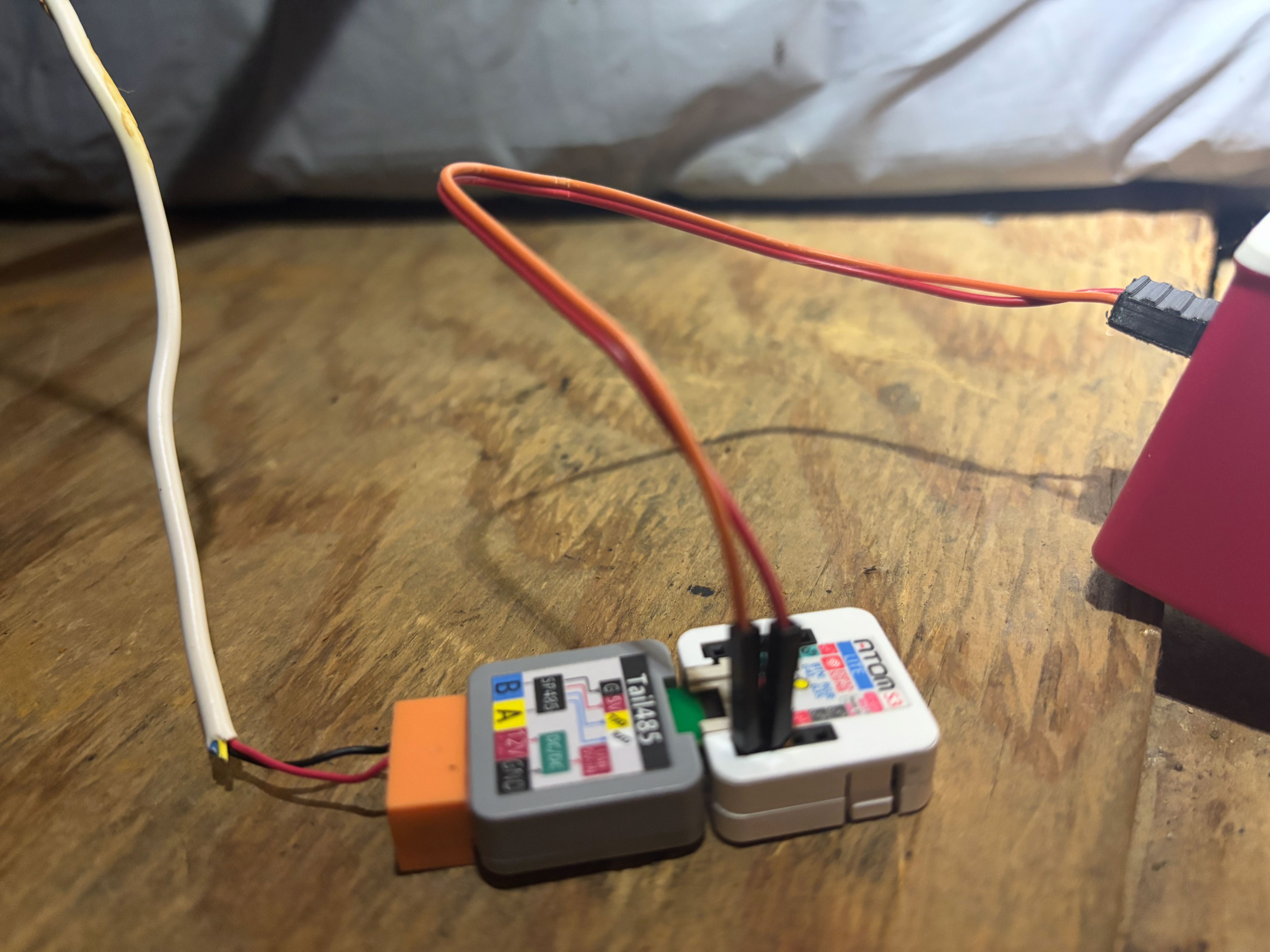
Here’s the final physical setup in my attic. The data wires go into the air handler, to the same terminal blocks that connect to the thermostat and heat pump data wires. The jumper wires lead to a 3D-printed adapter so that I can draw 5V power from a USB port on my Raspberry Pi.
Subscribing to the MQTT topic, the results were initially very garbled looking and mostly composed of FF bytes. After simply swapping the two data wires, though, I can now see data that looks like this:
% mosquitto_sub -h homeassistant.local -t radish/rs485/raw -v
radish/rs485/raw 00 FF 03 00 00 00 A5 77 00 01 00 A7 8C
radish/rs485/raw FF 01 03 00 00 00 01 F7 00 12 01 03 00 00 09 35 36 66 30 61 01 F9 4C 8E 5A 39 4A 8F 59 39
radish/rs485/raw 01 FF 03 00 00 00 A5 00 80 11 00 00 00 09 19 02 0A 40 04 03 F7 DA E2 A2 FF 94 1A B4 E8
radish/rs485/raw FF 01 03 02 05 00 01 41 00 06 01 08 00 00 00 F0 2F D8
radish/rs485/raw 01 FF 03 02 05 00 A5 41 80 11 06 00 00 09 19 02 0A 40 04 03 F7 DA E2 A2 FF 94 1A 43 0C
radish/rs485/raw 02 FF 02 02 05 00 01 41 00 06 01 08 00 00 00 F0 2C DB
radish/rs485/raw FF 02 02 02 05 00 05 41 A0 11 06 00 00 09 00 05 06 04 00 05 01 31 2C BC B8 62 EC D2 39
radish/rs485/raw 02 FF 02 00 00 00 A5 00 80 11 00 00 00 09 19 02 0A 40 04 03 F7 DA E2 A2 FF 94 1A B2 EA
This data might look rather meaningless, but it’s easy to begin interpreting it. Per the spec, the first 10 bytes of each frame are the message and packet headers, containing things like the destination and source address, the message type, and the packet length. Then there’s the actual payload, which is 0-240 bytes long, and finally a two-byte checksum.
Because I’ve spent way too much time looking at these, the raw bytes by themselves start meaning something to me, but here’s the translation of the first message, using some Python I wrote:
To: 0 (Broadcast)
From: 255 (Network Coordinator Address)
Subnet: 3 (>v1.0 Subordinates)
Send Method: 0 (Non-Routed)
Send Parameters: 0x0000 (Requesting device's index among its node type: 0)
Source Node Type: 165 (Network Coordinator)
Message Type: 0x77 (Token Offer)
Packet Number: 0 (Request/response packet; CT2.0 device)
Packet Length: 1
Payload:
  Node ID Filter: 0
Checksum: 0x8ca7
Everything except the payload is very straightforward to translate and is consistent across messages. Each payload’s translation, however, depends on which of the 63 message types is being used. Most of these are documented with consistent formats of their own in the specs, but a number of them are open-ended, which I’ll come back to.
Conversations
After implementing many of the various message types, I could begin to understand what was going on at a high level with the messages that I was seeing scroll down my terminal. For instance, the above sequence amounts to a conversation that goes something like this:
- Coordinator to all of Subnet 3: Does anybody have anything they want to say?
- Thermostat to Coordinator: I do!
- Coordinator to Thermostat: What would you like to say?
- Thermostat to Coordinator: Ask Heat Pump what it’s got for menu file 1, main menu 5.
- Coordinator to Thermostat: Okay
- Coordinator to Heat Pump: Thermostat wants to know what you’ve got for menu file 1, main menu 5.
- Heat Pump to Coordinator: Okay
- Coordinator to Heat Pump: Do you have anything to say?
And then it goes on with the heat pump providing the requested information to the network coordinator and getting acknowledged, and then the coordinator providing it to the thermostat and getting acknowledged.
In general, sequences like this are how the network operates. There’s a device called the network coordinator that controls signalling on the network and passes messages between components. In my case, it coexists with the air handler. The coordinator goes around asking other components if they have anything to say. This is because, for the most part, a subordinate device may only speak when spoken to. If a device does have a message to send, the coordinator receives and acknowledges the messages and then either answers it directly or routes it to the appropriate device. The coordinator also occasionally does things to manage the network, such as ask if there are any new devices, broadcast which devices currently exist, or offer arbitration in case another device might be a better coordinator.
Missing Data
So now I’m fairly comfortable seeing the sequences of various messages being passed around and can focus more on the data itself. This is where things can get tricky, because as I mentioned, some of the payloads are open-ended. For instance, let’s look at this response, after the thermostat requested the air handler’s current status:
To: 1 (Priority Subordinate Address, Subnet 2 or 3, thermostat or zone controller)
From: 255 (Network Coordinator Address)
Subnet: 3 (>v1.0 Subordinates)
Send Method: 2 (Routing by Priority Node Type)
Send Parameters: 0x0003 (Targeted node type: 3 (Air Handler), Source node index 0, or initial request to or response from coordinator)
Source Node Type: 3 (Air Handler)
Message Type: 0x82 (Get Status Response)
Packet Number: 0 (Request/response packet; CT2.0 device)
Packet Length: 67
Payload:
  Status MDI Record Count: 2
  Source Node Type: 3 (Air Handler)
  Record 1: db_id=0x00, length=20, value=00:00:00:01:74:0f:00:00:00:00:00:00:1b:02:00:74:00:00:00:00
    Status: Air Handler Status Data (Table 162)
      Critical Fault: 0
      Minor Fault: 0
      Heat Requested Demand: 0.0%
      Fan Requested Mode: Cool (1)
      Fan Requested Demand: 58.0%
      Fan Requested Rate/Slew: 15s
      Fan Requested Delay: 0s
      Defrost Requested Demand: 0.0%
      Emergency Requested Demand: 0.0%
      Aux Requested Demand: 0.0%
      Humidification Requested Demand: 0.0%
      Dehumidification Requested Demand: 0.0%
      Current Airflow: 539 CFM
      Current Heat Actual Status: 0.0%
      Current Fan Actual Status: 58.0%
      Fan Current Rate Status: 0s
      Fan Current Delay Remaining Status: 0s
      Current Humidification Actual Status: 0.0%
      Current Dehumidification Actual Status: 0.0%
  Record 2: db_id=0x01, length=43, value=00:ff:ff:ff:ff:00:00:00:00:f3:80:ff:ff:ff:ff:00:00:00:80:00:80:00:80:00:80:00:80:00:00:00:80:00:80:00:80:00:80:00:80:41:c0:00:00
  Decode Warning: No Status MDI definition for node type 3 (Air Handler), DB ID 0x01
Checksum: 0xf0c0
In this case, the payload is a series of Message Data Interface (MDI) records, each with its own database ID, length, and value. For db_id=0x00 from an air handler, the meaning of all the value bytes is documented. However, db_id=0x01 is not in the spec: it’s something that Daikin has defined themselves. Therefore, I have no direct way of knowing what those payload bytes actually mean. In some instances, by comparing decimal value of individual or groups of bytes to values seen at the same time from the API, their meanings might be deduced. For instance, that f3 byte may correspond to a field with a current value of 243, or something reasonably derived from it, like 24.3 or 2430. On the other hand, there are too many values in the API results with values of 0 or 255 to be able to determine what those 00 or ff bytes represent. So, it will take a lot more data, both from my own system and from others with slightly different setups in order to decode every missing byte.
Join If You Dare
A casual user can stop here. There now exists a way to silently snoop on the network, extract its real-time data, and parse most of it, all without having to go through the API. That is an amazing accomplishment, but it doesn’t solve my thermostat complaints. Therefore, the next step is to try to actually join the network and become an active participant.
Conceptually, active participation can be broken down into five steps:
- Register as a new device on the network.
- Send request messages to other nodes to tease out information that isn’t already being shared.
- Send control commands to actually effect change.
- Fully replace the thermostat’s functionality.
- (Optional) Take over responsibilities as the network coordinator.
To do this, the Radish device needed to be smarter and do more than can be accomplished with a simple lambda function, as in its original configuration. In order to stay within the ESPHome framework, this meant writing some C++ code as an external component. Broadly speaking, the new component code consists of four parts:
- A controller, which receives messages, acknowledges them, passes them up to the AutoNet client or subordinate service, and enqueues and sends responses to the network
- Code to push the raw bytes (both received and sent) to MQTT for external analysis
- An AutoNet client, which manages the network connection
- A subordinate service, which generates requests and commands, processes incoming operational data, and contains the core application logic
While initially working on the first step, when the Radish attempted to join the network, the messages appeared to be correct, but it somehow caused communication faults, and equipment shut down*. Upon disabling it, the network could reset, and things returned to normal. I don’t know what was wrong, but it seems to be resolved. So now, I’ve completed the first step: the Radish can respond to the coordinator’s Node Discovery Request and subsequent messages in order to register on the network as a lowly temperature sensor, and its existence is announced to the other devices. It then sits there politely, responding to keep-alive messages, but otherwise not interacting with the other equipment.
Next Steps
This puts me on Step 2, and so far I’ve added some request messages for the Radish to send out. These are triggered via the Home Assistant API and allow me to interrogate devices on my own timeline, rather than waiting for certain messages to be seen naturally (if at all). This is helpful for furthering my understanding of the system as well as decoding missing message payloads, since I’ll be able to be more precise in aligning my queries with GET requests to the Skyport API.
Here’s something I’ve already discovered: nothing ever asks the thermostat for its data, but when I have the Radish request some of it, it gives empty responses. I guess Daikin didn’t feel the need to include that in the OneTouch software, since they didn’t anticipate someone like me actually requesting it. Unfortunately, unless data is available through messages I haven’t tried yet, this means that it’s impossible to have the same visibility/control of the system (with the current thermostat) via the ClimateTalk bus as can be done through the Skyport API.
Once I’ve implemented all the request messages in Step 2, Step 3 will mostly involve experimentation and getting comfortable with sending control commands to the network, since there’s more danger in screwing something up and damaging equipment. It would also be useful, again, for trying to decode unknown message payload bytes.
Step 4, the impetus for the project, is to be able to replace the thermostat’s functionality. Already, there is the Radish device located in the attic next to the air handler. There are also a few separate ESPHome-based temperature sensors throughout the house. For boiler control, I would add a relay to the one in the basement. Then, on one of these devices or my Raspberry Pi, there would be a program that collects data, determines a course of action, and commands the equipment. This control algorithm may start out simple, and over time, I could incorporate features such as model predictive control, demand response, and even weather forecasts. The existing thermostat would be disconnected from the network but could potentially still serve as a user interface.
If I’m really ambitious, I will design a replacement thermostat. This would use the existing 24VAC power and have relays, a dial, and a touchscreen as an all-in-one packaged solution. At the risk of a cease-and-desist letter from Daikin, maybe I could even offer it for sale.
Step 5, taking over as network coordinator, isn’t necessary in my case, because the air handler is a Full Functionality Device and serves in that role. However, if someone is trying to assemble a network of equipment without such a device, then that capability would have to be added.
Other Systems
As of now, the Radish project has only been developed/tested on my specific Daikin equipment setup. It should work just the same on communicating systems from Goodman and Amana, as they’re all the same company. There also may be overlap with the EcoNet protocol from Rheem/Ruud, as it is supposedly based on ClimateTalk too. For that, though, the ESPHome-econet project is likely the better approach.
If others have systems of their own and are willing to test out the project and provide feedback, that would be immeasurably helpful. I’m especially interested in equipment like air conditioners, furnaces, and heat strips. Also, Daikin now offers a zone control panel that can connect additional thermostats, dampers, and other equipment. Although it uses the bus, much of its behavior is likely not documented in the spec and would require significant reverse engineering, but it would be a gold mine to investigate. Finally, Daikin sells compatible air quality and combination temperature/humidity sensors, but these use WiFi/Bluetooth to share their data with the thermostat, not the ClimateTalk bus, so they’re probably not very relevant to this project.
Conclusion
Though I mostly work in AI and computer vision now, it was HVAC controls that first got me into programming, and I’m happy to have this diversion. This project has been going on for a while now, and though it’s still in development, I’m excited to share its existence with the world and solicit feedback. For a deeper dive into the project’s technical specifics, or to try to implement it yourself, take a look the repo and docs. These will be updated as the project progresses, and rest assured of future blog posts as well.